Documentation
SpreadB Docs
Everything you need to build, manage, and grow on the SpreadB influencer marketing platform.
Installation›Install on Android
Everything you need to build, manage, and grow on the SpreadB influencer marketing platform.
Learn how to download, install, and set up the SpreadB mobile application on your Android device.
The SpreadB Android app enables Brand Owners and Influencers to manage campaigns, communicate securely, receive real-time notifications, and handle payments from anywhere. The app is optimized for Android smartphones and tablets, providing a fast, secure, and responsive experience.
Before installing the application, ensure that your device meets the following requirements:
| Requirement | Minimum Specification |
|---|---|
| Android Version | Android 8.0 (Oreo) or later |
| RAM | 3 GB or higher |
| Storage | At least 200 MB available |
| Internet | Stable Wi-Fi or Mobile Data |
| Google Play Services | Latest Version Recommended |
SpreadB can be installed using one of the following methods:
Open the Google Play Store on your device.
Search for "SpreadB".
Tap Install on the official app listing.
Wait until the installation completes.
Tap Open to launch the app.
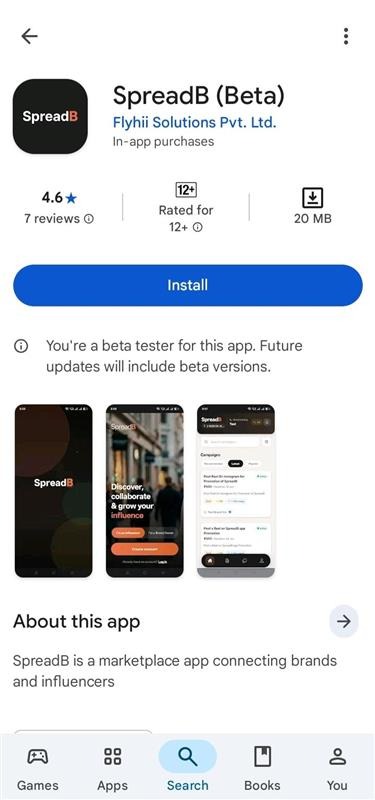 SpreadB listing on the Google Play Store
If you received an APK directly from the SpreadB team:
Download the latest APK file.
Open the downloaded file from your notifications or File Manager.
If prompted, enable "Install Unknown Apps" for the target source.
Continue and confirm the installation.
Wait for the installation to finish and open the application.
When you open the app for the first time, you'll be guided through a quick setup process where you can:
SpreadB requests only the permissions necessary to provide core functionality:
| Permission | Purpose |
|---|---|
| Camera | Upload profile photos and campaign content |
| Photos & Media | Select images and videos for campaigns and submissions |
| Notifications | Receive instant campaign updates and chat notifications |
| Location | Discover nearby campaigns matched to your city (optional) |
| Storage | Download agreements and documents directly to your downloads folder |
Note: You can manage, allow, or revoke these permissions anytime from your Android Settings application.
After installation is completed:
Open the SpreadB application.
Enter your registered email address.
Type in your account password.
Verify your email OTP code if prompted.
Complete authentication to access your role dashboard.
If you're new to the SpreadB platform:
To receive campaign invitations, chat messages, payment updates, and important account alerts:
Open your Android Settings app.
Navigate to Apps → SpreadB.
Select Notifications and toggle on "Allow Notifications".
We recommend enabling automatic updates from the Google Play Store:
Regular updates ensure access to new features, performance improvements, security enhancements, and bug fixes.
Ensure your device has at least 200MB of free storage space. Verify that your device is running Android 8.0 or later, and double-check your internet connection if the Play Store download stalls. If installing an APK, re-download the file to make sure it is not corrupted.
Try restarting your device. If that doesn't work, navigate to Android Settings → Apps → SpreadB → Storage, and tap Clear Cache. Alternatively, you can uninstall and reinstall the application.
Verify that your email address and password are correct. Make sure your account verification has been completed. If you forgot your password, tap Forgot Password on the sign-in screen to trigger a reset email.
Check your Spam or Junk folders. Ensure your registered email address is correct. Wait a few minutes and tap Resend OTP on the verification screen.
Now that SpreadB is installed, continue with the next guide: